Author: Hirendra

  • El Niño vs La Niña Explained: How the Pacific Ocean Shapes Global Weather

    El Niño vs La Niña Explained: How the Pacific Ocean Shapes Global Weather

    The Great Pacific Seesaw: Understanding El Niño and La Niña

    The Earth’s climate is a complex web of interconnected systems, but few phenomena have as dramatic an impact on global weather as the cycle of El Niño and La Niña. These two events, which originate in the tropical Pacific Ocean, can dictate whether regions experience devastating floods, scorching droughts, or unusually harsh winters.

    The “Normal” State of the Pacific

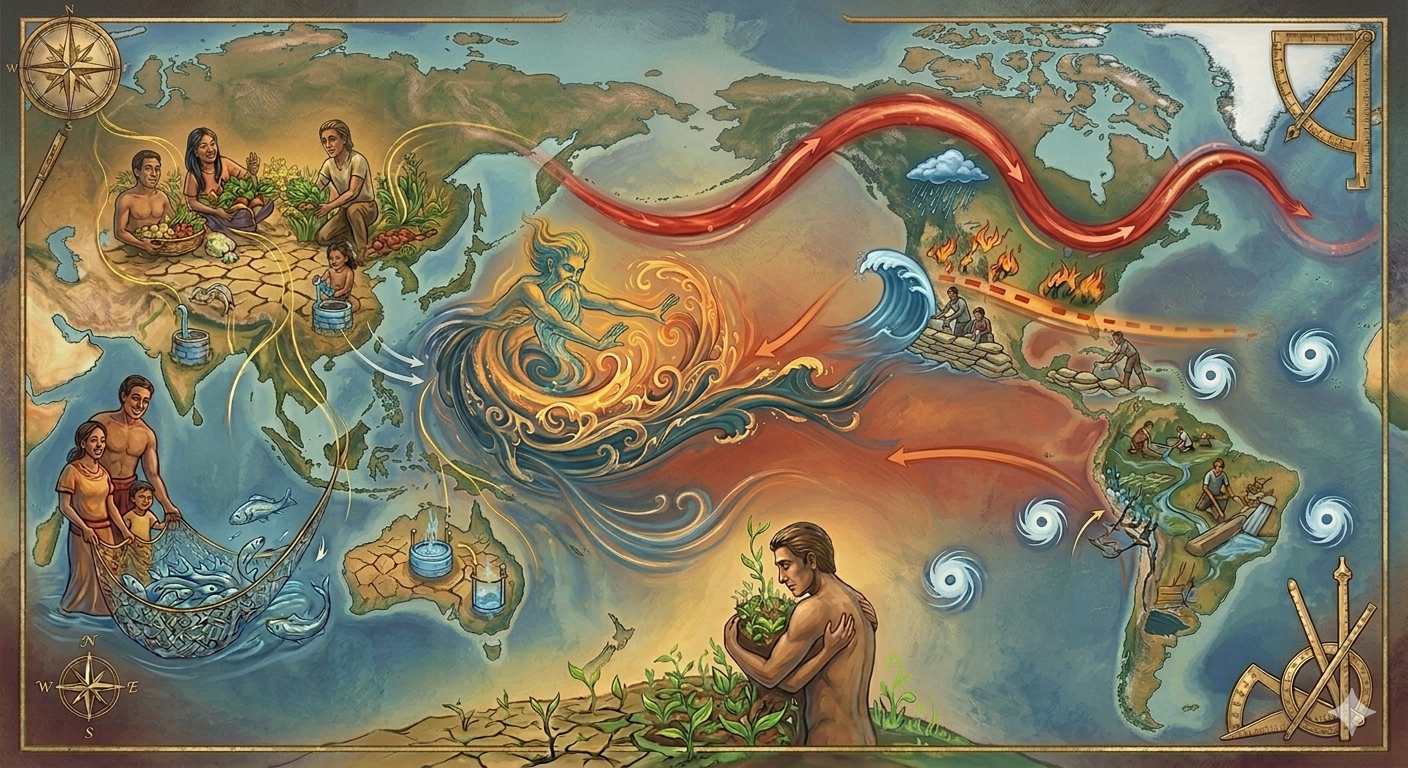
    To understand these phenomena, we must first look at the “neutral” state of the Pacific Ocean. Normally, Trade Winds blow from East to West across the equator. These winds act like a giant broom, pushing warm surface water toward Southeast Asia and Australia.

    As that warm water moves West, cold water from the deep ocean rises to the surface off the coast of South America—a process known as upwelling. This creates a temperature imbalance: warm and rainy in the West, cool and dry in the East.


    El Niño: The Warming Phase

    An El Niño event begins when these steady trade winds weaken significantly, sometimes briefly reversing in certain regions. Without the wind’s push, the warm water piled up in the West begins to slosh back toward the Americas.

    • The Ocean Shift: Upwelling slows down, and the Eastern Pacific becomes significantly warmer than average.
    • The Atmospheric Shift: Because warm water fuels rainfall, the area of unsettled weather moves toward the center of the Pacific. This shifts atmospheric circulation patterns and can alter the position of the jet stream in different regions.
    • Global Consequences:
      • Americas: Increased risk of flooding in Peru and the Southern United States.
      • Asia/Australia: El Niño is often associated with weaker monsoons and drought risk in India, Indonesia, and parts of Australia.
      • Global Heat: El Niño releases massive amounts of energy into the atmosphere, often making these years some of the warmest on record.

    La Niña: The Cooling Phase

    La Niña is essentially the “flip side” of the oscillation. It occurs when the normal Trade Winds become stronger than usual, pushing even more warm water toward Asia and intensifying the upwelling of cold water in the East.

    • The Ocean Shift: The Eastern Pacific becomes unusually cold, with this cool water extending far out into the central ocean.
    • The Atmospheric Shift: The Jet Stream is pushed northward.
    • Global Consequences:
      • North America: Cooler temperatures and heavy rains in the Pacific Northwest, but drought conditions in the Southern U.S..
      • Asia: La Niña often strengthens monsoon rainfall in parts of South and Southeast Asia, increasing flood risk.

    Why Does It Matter?

    The El Niño-Southern Oscillation (ENSO) The atmospheric component of this cycle is called the Southern Oscillation, which refers to changes in air pressure across the Pacific Ocean. Together, the oceanic and atmospheric changes form ENSO.

    ENSO is more than just a meteorological curiosity; it is a critical factor in global survival. By influencing extreme weather, these cycles directly impact food production, water supplies, and human health.

    Whether it is a farmer in India waiting for a monsoon that never comes during an El Niño year, or a homeowner in the Southern U.S. preparing for flooding, the “Seesaw” of the Pacific remains one of the most powerful forces on our planet.

  • Xbox Mode on Windows 11: How to Turn Your PC into a Console

    Xbox Mode on Windows 11: How to Turn Your PC into a Console

    What is Xbox Full Screen Experience (FSE)?

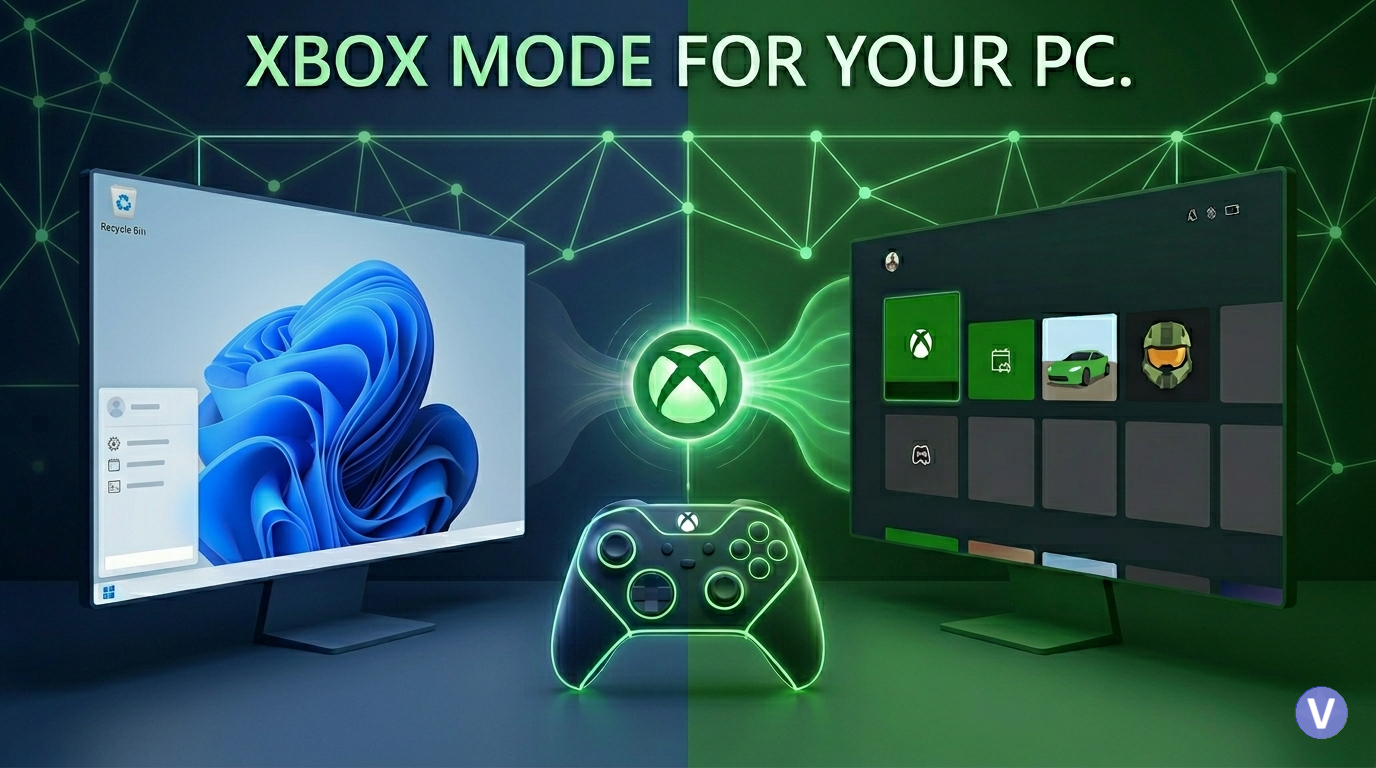
    Xbox Mode is an experimental feature currently being tested in Windows Insider builds, Designed with modern gaming devices and controller-first experiences in mind, that completely re-imagines the standard desktop interface.

    It is similar to Steams “Big Picture Mode” for your PC. It provides a full-screen gaming interface layered on top of Windows, rather than replacing the operating system with a simplified, controller-friendly interface dedicated entirely to your game library and the Xbox App. It’s the perfect solution for turning a living room PC or a gaming laptop into a console.


    Why You Should Use It: The Benefits

    The biggest reason to use FSE is resource optimization. Because this mode significantly reduces the amount of background activity on your PC.

    The Key Advantages:

    • Save 2GB of System RAM: Tests have shown that running in FSE mode can free up an average of 2 GB of RAM. This is massive for systems with limited RAM (like 16GB) or iGPUs (which share system memory with the graphics processor).
    • Multitask Like a Console: The mode allows you to have multiple games running at once and seamlessly swap between them. By using a controller’s Xbox Button, you can open a dedicated task switcher to jump between active games.
    • A True Living Room Experience: FSE makes using a PC in your living room far easier. You can navigate your entire Game Pass library, launch games, and switch between applications using only an Xbox controller.
    • Performance Gains (Small but Real): While you shouldn’t expect a miraculous jump in frame rates, you may see minor gains. In early tests, some benchmarks like Cyberpunk 2077 saw an increase of 1-2 FPS simply because fewer resources were being diverted to the desktop.

    How to Activate Xbox Mode on Your PC

    Currently, this feature is available through the Windows Insider Program. Follow these steps to get it running on any Windows 11 machine.

    Step 1: Join the Xbox Insider Preview

    • Go to the Microsoft Store and download the Xbox Insider Hub.
    • Once installed, launch the app and navigate to Previews > PC Gaming.
    • Choose Manage Opt-in and opt into the PC Gaming preview.

    Step 2: Join the Windows Insider Program

    • Open your PC Settings.
    • Go to Windows Update > Windows Insider Program.
    • Click Get Started and link your Microsoft/Xbox account.
    • Important: When prompted, select either the Dev Channel or the Beta Channel. (The Beta Channel is highly recommended for stability).
    • Restart your PC to complete the update process.

    Step 3: Enable Xbox Full Screen Experience

    • After your PC restarts, return to Settings.
    • Go to Gaming > Full Screen Experience.
    • Toggle “Enter full screen experience on startup” to ON.
    • Your default Home App will be set to the Xbox App.

    Control and Navigation

    While you can navigate FSE with a keyboard and mouse, it is explicitly designed for an Xbox Controller.

    • Enter Mode (Manual): If you don’t use the startup option, you can enter FSE at any time by pressing Windows + G and selecting it from the Game Bar.
    • Quick Menu: Pressing the Xbox Button (the central “Guide” button) will open the familiar Game Bar overlay.
    • Task Switching: To swap between active games, HOLD the Xbox Button. This will bring up the dedicated task switcher, allowing you to quickly jump to another running application or game.

    Wrapping Up: The Start of a Great Feature

    Microsoft has indicated that FSE will continue to receive updates, including the ability to set other applications (like Steam’s Big Picture Mode) as your default Home App. For now, it’s a powerful, resource-saving tool that significantly improves the experience of gaming on a standard Windows 11 PC.

  • Understanding AI Models: How ChatGPT, Gemini & Modern AI Work (2026 Guide)

    Understanding AI Models: How ChatGPT, Gemini & Modern AI Work (2026 Guide)

    To understand the current AI landscape, it is essential to distinguish between the AI application and the AI model. Most users interact with “doors” like ChatGPT, Microsoft Copilot, or the Gemini app; however, these are merely the interfaces. Behind each door is a giant AI brain—the model—doing the heavy lifting. These models are not databases of memorized facts; rather, they are trained on massive amounts of text, code, and websites to recognize patterns in language.

    At their core, these models function by predicting the next word (or “token”) in a sequence. While it may look like the AI is “thinking,” it is actually a sophisticated mathematical function that assigns a probability to every possible next word based on the text provided. This prediction process is driven by parameters (or weights)—continuous values that determine the model’s behavior. Modern Large Language Models (LLMs) contain hundreds of billions of these parameters (depending on architecture), which are refined through a process called backpropagation, where the model’s guesses are compared against trillions of real-world examples (tokens) until its predictions become uncannily fluent.


    The Architecture of Large Language Models (LLMs)

    The “Large” in LLM refers to both the parameter count and the staggering scale of training data. For example, it would take a human over 2,600 years of non-stop reading to consume the data used to train GPT-3. The computational power required for the largest models is equally immense, involving operations that would take a standard computer over 100 million years to perform if not for specialized GPU chips that run calculations in parallel.

    A pivotal moment in LLM history was the 2017 invention of the Transformer architecture. Unlike older models that read text word-by-word, Transformers process text in parallel using attention mechanisms, allowing them to understand relationships between words more efficiently than older sequential models. They use an “attention” mechanism that allows the model to refine the meaning of a word based on its context. For instance, it can mathematically distinguish if the word “bank” refers to a financial institution or the side of a river by looking at the surrounding words all at once.

    Beyond the initial “pre-training” on the internet, chatbots undergo Reinforcement Learning with Human Feedback (RLHF). In this stage, human feedback is used to rank responses, helping train the model to produce more helpful and safe outputs., further tuning the parameters to ensure the model acts as a helpful assistant rather than just a random text completer.


    A Comprehensive Guide to Modern AI Models

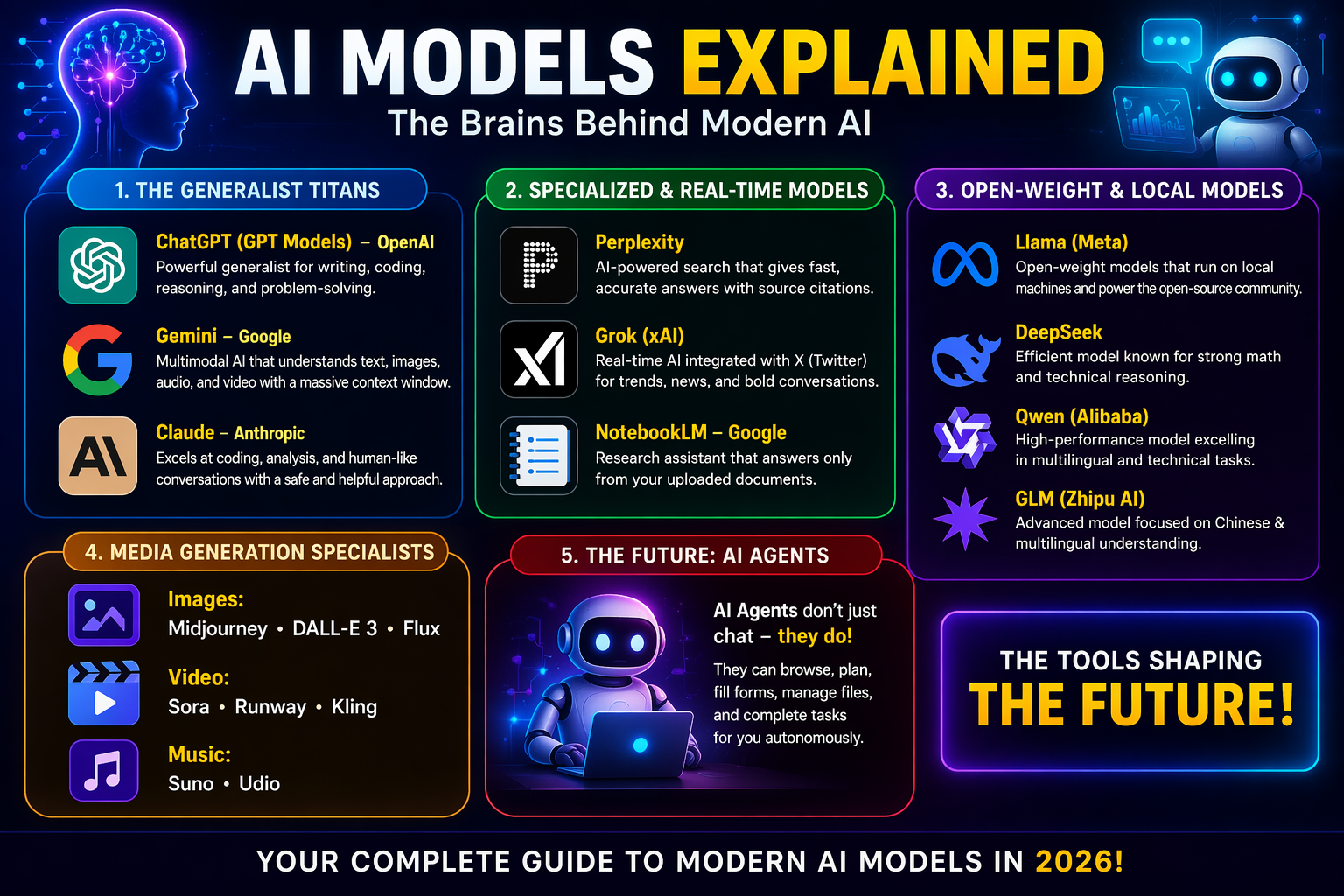
    By 2026, the AI ecosystem has branched into several specialized categories, each with distinct “superpowers.”

    1. The Generalist Titans

    • GPT (OpenAI): The flagship GPT Model is a well-rounded generalist that handles writing, coding, and image analysis. Its primary strength is obedience; it follows complex, multi-step instructions more reliably than its competitors. OpenAI also features the o1 series, which is specifically designed for deep reasoning and complex math problems.
    • Gemini (Google): Known for its massive context window (up to 2 million tokens equivalent to 10 average novels), Gemini can process entire novels or hour-long videos in a single pass. It is natively multimodal, meaning it can “watch” video and “listen” to audio directly rather than converting it to text first. Gemini Pro is deeply integrated into Google Docs and Gmail, while Gemini 3 Flash offers a faster, cheaper alternative for everyday tasks.
    • Claude (Anthropic): Often cited as the best for coding and deep analysis, the flagship Claude Opus writes functional code more consistently than others. It is also praised for its human-like tone and its ability to match a specific writing style or voice for polished first drafts.

    2. Specialized and Real-Time Models

    • Perplexity: This is a “search scalpel” designed for finding accurate facts fast. Unlike general chatbots, it actively searches the live web and typically provides source-backed answers with citations for every claim it makes.
    • Grok (xAI): Integrated directly into the X (formerly Twitter) platform, Grok excels at analyzing real-time trends and breaking news. It is known for a more relaxed, conversational tone and its willingness to answer sensitive questions that other models might refuse.
    • NotebookLM: A specialized tool designed for high-stakes accuracy. It acts as a “walled garden,” answering questions only from the sources the user provides to minimize the risk of hallucination.

    3. Open-Weight and Local Models

    These models allow users to run AI on their own hardware, ensuring privacy and no subscription fees.

    • DeepSeek: A powerful model focused on math and technical reasoning that can be run at a fraction of the cost of proprietary models.
    • Llama (Meta): The foundation for much of the open-source community, available in various sizes to run on everything from gaming PCs to massive data centers.
    • Qwen and GLM: High-performance models from Alibaba and Zhipu AI that excel at multilingual tasks and technical benchmarks.

    4. Media Generation Specialists

    Images

    • Midjourney remains the leader for artistic quality, while DALL-E 3 is the easiest to use within ChatGPT. Flux is the open-source leader for prompt precision.

    Video

    • Sora leads in cinematic quality and realistic physics, while Runway 5 offers advanced creative controls like “motion brushes”. Kling is optimized for speed, generating audio and video simultaneously.

    Music

    • Suno and Udio can generate full songs with vocals and instruments from a single text prompt, with Udio focusing on licensed training data through partnerships with major music labels.

    The Future: AI Agents

    The next phase of AI is the shift from “chatting” to “doing.” AI agents (such as OpenAI’s Operator or Google’s Project Mariner) are systems that don’t just give advice; they execute tasks. These agents can navigate your screen, fill out forms, and manage files, effectively acting as an autonomous digital intern to complete multi-step workflows on your behalf.

  • The Ultimate OTT Binge Guide: Best Indian & International Series to Watch in 2026

    The Ultimate OTT Binge Guide: Best Indian & International Series to Watch in 2026

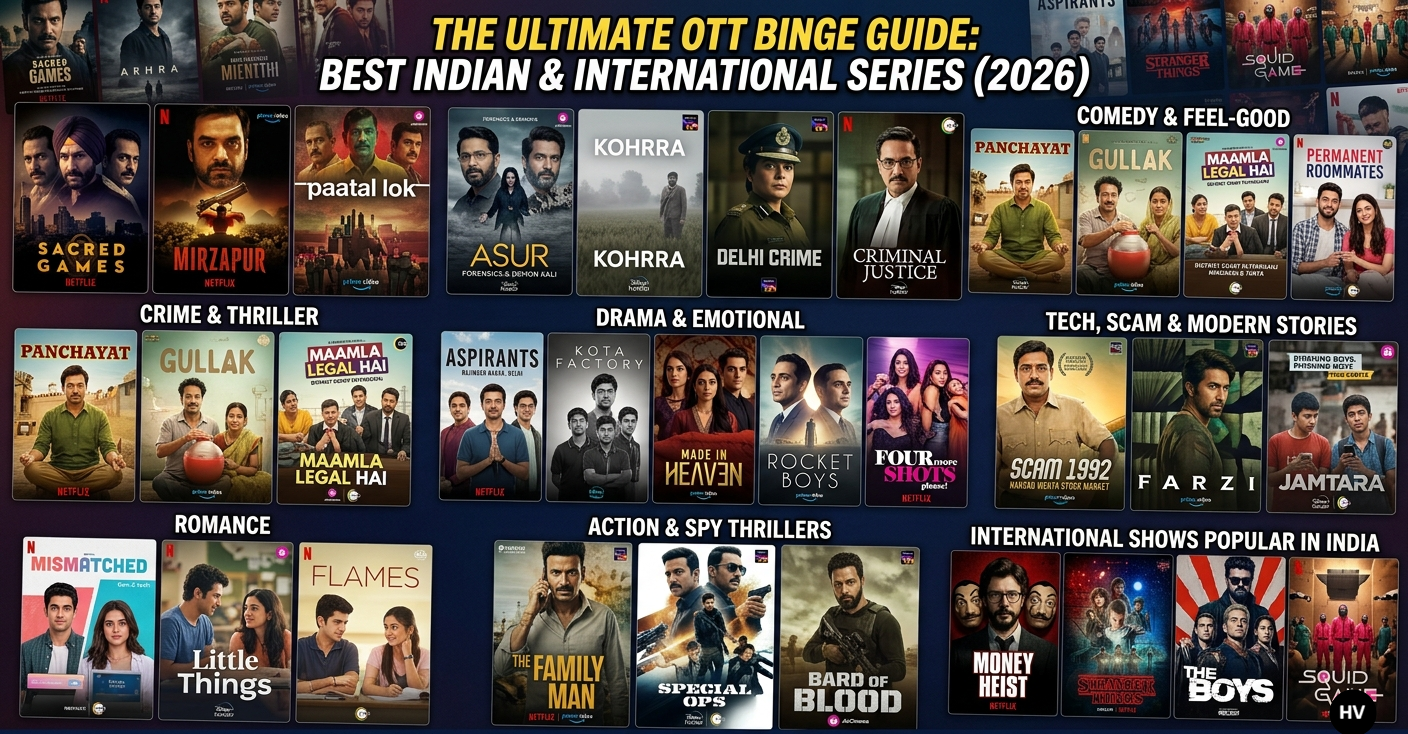
    The digital entertainment space in India has exploded, offering everything from gritty underworld chronicles to heartwarming stories of rural life. Whether you are looking for a weekend marathon or a quick weeknight watch, here is the definitive list of top-rated OTT series across every major genre.

    Crime & Thriller Series

    • Sacred Games (Netflix): This pathbreaking series intertwines the lives of a cynical police officer, Sartaj Singh, and a powerful crime lord, Ganesh Gaitonde. As Gaitonde warns of an impending catastrophe, Sartaj must navigate the dark history of Mumbai’s underworld to save the city. It is a masterful blend of mythology, gritty action, and deep-seated corruption.
    • Mirzapur (Prime Video): Set in the lawless heartland of Uttar Pradesh, this saga follows the “King of Mirzapur,” Kaleen Bhaiya, and his reckless son, Munna. When a local lawyer’s family gets dragged into their violent world, it sparks a brutal war for power. It’s known for its raw dialogue, shocking twists, and intense character studies.
    • Paatal Lok (Prime Video): A down-and-out cop, Hathiram Chaudhary, is assigned a high-profile assassination case that seems straightforward but leads him into a terrifying multi-layered conspiracy. The show brilliantly explores the “three worlds” of modern India—from elite power circles to the dark, forgotten underbelly of the “Paatal Lok.”
    • Asur (JioCinema): A unique psychological thriller that bridges the gap between modern forensic science and ancient Indian mythology. It follows a team of CBI experts chasing a serial killer who believes he is an incarnation of the demon Kali. The cat-and-mouse game between the killer and the lead investigators is both haunting and intellectual.
    • Kohrra (Netflix): Set against the fog-laden fields of Punjab, this slow-burn mystery begins with the discovery of a murdered NRI groom. As two local cops peel back the layers of the investigation, they uncover deep family trauma, toxic masculinity, and long-buried secrets that are far more disturbing than the crime itself.
    • Delhi Crime (Netflix): This Emmy-winning procedural offers a gritty, realistic look at the Delhi Police’s investigation into high-profile real-life crimes. Led by DCP Vartika Chaturvedi, the series focuses on the painstaking forensic work and the emotional toll on the officers who work within a strained and often criticized system.
    • Criminal Justice (Disney+ Hotstar): Starring Pankaj Tripathi as the witty yet humble lawyer Madhav Mishra, each season follows a different high-stakes case. Whether it’s defending a young man accused of a one-night-stand murder or a wife accused of stabbing her husband, the show is a gripping deep-dive into the flaws and triumphs of the Indian legal system.

    Comedy & Feel-Good Shows

    • Panchayat (Prime Video): Abhishek, an engineering graduate, reluctantly takes a low-level government job in a remote village called Phulera. What starts as a struggle to survive rural life turns into a heartwarming journey as he bonds with the quirky village head and locals, finding beauty in the most mundane rural politics.
    • Gullak (SonyLIV): Unlike grand dramas, Gullak focuses on the “anecdotes” of the Mishra family living in a small North Indian town. It captures the essence of middle-class life—from bickering over a piggy bank to the quiet sacrifices parents make for their children—all delivered with a heavy dose of nostalgia and humor.
    • Maamla Legal Hai (Netflix): Set in the chaotic District Court of Patparganj, this satirical comedy follows a group of eccentric lawyers and their bizarre legal battles. It’s a witty take on the “jugaad” culture of the Indian legal system, where every case is a mix of high-stakes drama and laugh-out-loud absurdity.
    • Permanent Roommates (TVF/ZEE5): As the show that arguably started the Indian web series revolution, it follows Mikesh and Tanya, a couple who decide to move in together after three years of long-distance. Their struggle to balance their vastly different personalities makes for a realistic and hilarious look at modern relationships.

    Drama & Emotional Series

    • Aspirants (Prime Video): Centered in Rajinder Nagar, Delhi, this show chronicles the lives of three friends—Abhilash, Guri, and SK—as they navigate the grueling pressure of UPSC exams. It moves between their past as struggling students and their present lives as adults, reflecting on the friendships and dreams lost or found along the way.
    • Kota Factory (Netflix): Shot in stark black-and-white, this series is a tribute to the millions of students who flock to Kota for IIT coaching. It follows Vaibhav, a teenager dealing with academic pressure and loneliness, guided by the legendary mentor “Jeetu Bhaiya” who teaches life lessons alongside physics.
    • Made in Heaven (Prime Video): This lavish series follows two wedding planners in Delhi, Tara and Karan, as they navigate the extravagant and often hypocritical world of elite Indian weddings. Behind the glitz and glamour, the show exposes deep-rooted social issues like casteism, infidelity, and the struggle for LGBTQ+ rights.
    • Rocket Boys (SonyLIV): A beautifully crafted historical drama that tells the story of Homi Bhabha and Vikram Sarabhai, the visionaries who built India’s nuclear and space programs. It’s a tale of scientific ambition, deep friendship, and the challenges of building a new nation against the backdrop of global politics.
    • Four More Shots Please! (Prime Video): Set in millennial Mumbai, this bold series follows four unapologetically flawed women as they navigate love, careers, and personal growth. Whether they are dealing with workplace sexism or complex family dynamics, their bond—and a lot of tequila—keeps them grounded.

    Tech, Scam & Modern Stories

    • Scam 1992 (SonyLIV): This breakout hit chronicles the meteoric rise and thunderous fall of stockbroker Harshad Mehta. Set in the 1980s and 90s, it’s a masterclass in financial storytelling, capturing how one man’s ambition manipulated the entire Indian banking system.
    • Scam 2010 (SonyLIV): The latest installment in the Scam franchise, this series is reported to focus on the Subrata Roy (Sahara Group) saga. It in development and is expected to explore the intersection of finance, politics, and the massive chit-fund empire that gripped the nation for decades.
    • Farzi (Prime Video): A disillusioned artist, Sunny, uses his incredible talent to create the “perfect” counterfeit currency note. As he gets sucked into a massive international crime syndicate, he is pursued by a relentless task force officer, Michael, in a high-stakes game of cat-and-mouse.
    • Jamtara: Sabka Number Ayega(Netflix): Based on true events, this gritty drama takes you inside the phishing capital of India. It follows a group of small-town youths who use simple phones and social engineering to steal millions from unsuspecting citizens, caught between a corrupt politician and a determined cop.

    Romance Series

    • Mismatched (Netflix): A modern college romance where a tech-wizard girl, Dimple, meets a traditionalist boy, Rishi. Set at a summer coding camp, the show explores the “mismatched” chemistry between Gen-Z digital ambition and old-school romantic ideals.
    • Little Things (Netflix): This series celebrates the beauty of ordinary life through the relationship of Dhruv and Kavya. There are no grand villains or dramatic twists—just two people living together in Mumbai, navigating work stress, small arguments, and the quiet joys of a long-term relationship.
    • Flames (Prime Video/MiniTV): A nostalgic trip back to the era of tuition centers and school-time crushes. It captures the innocence of first love, the anxiety of exams, and the simple thrill of sharing a soda after class with someone special.

    Action & Spy Thrillers

    • The Family Man (Prime Video): Srikant Tiwari is a world-class spy who must save the country from terror threats while also worrying about his grocery list and his kids’ school grades. It’s a perfect mix of high-stakes espionage and hilarious, relatable middle-class domestic life.
    • Special OPS (Disney+ Hotstar): Himanshu Singh is a RAW agent who spends 19 years tracking a single mastermind behind multiple terror attacks. The show spans several countries and decades, offering a sleek, intelligent look at the world of counter-terrorism and intelligence.
    • Bard of Blood (Netflix): An ex-spy, Kabir Anand, is pulled out of his quiet life as a teacher for a dangerous rescue mission in Balochistan. Based on Bilal Siddiqi’s novel, it’s a fast-paced thriller involving political intrigue, secret agencies, and high-intensity combat.

    International Shows Popular in India

    • Money Heist (Netflix): A mysterious man known as “The Professor” recruits eight robbers to pull off the biggest heist in history at the Royal Mint of Spain. It’s an adrenaline-fueled series where every step of the robbery is a psychological battle against the police.
    • Stranger Things (Netflix): When a young boy vanishes from a small town, his friends uncover a series of supernatural mysteries, secret government experiments, and a terrifying alternate dimension known as the “Upside Down.” It’s a love letter to 80s nostalgia and sci-fi.
    • The Boys (Prime Video): In a world where superheroes are corrupt celebrities owned by a massive corporation, a group of vigilantes known as “The Boys” sets out to expose the truth and take them down. It’s a dark, violent, and satirical take on the superhero genre.
    • Squid Game (Netflix): Hundreds of cash-strapped contestants accept a strange invitation to compete in children’s games for a massive prize. However, the stakes are deadly, and the games become a chilling social commentary on class struggle and human nature.

    What’s on Your Watchlist?

    We want to hear from you! Which of these series are you most excited to start, or did we miss a hidden gem that everyone needs to know about?Drop a comment below and let us know your top pick for 2026. If you found this guide helpful, don’t forget to share it with your binge-watching partner!

  • A 6-Phase Guide to Fixing “VIDEO DXGKRNL FATAL ERROR”

    A 6-Phase Guide to Fixing “VIDEO DXGKRNL FATAL ERROR”

    You’re mid-game or deep into a project when the screen freezes, the ‘Blue Screen of Death’ (BSOD) appears, and your PC reboots. If you’ve already tried reinstalling your drivers only to see the same errors return, you aren’t alone. Video DXGKRNL Fatal Error and Event ID 14 are common ‘wall’ errors that stop most users in their tracks. This expanded guide moves beyond basic advice, offering a professional-grade troubleshooting protocol that scales from simple software repairs to advanced hardware diagnostics. We’ll help you determine if your issue is a fixable software bug or a sign that your GPU needs a physical checkup.

    Phase 1: Advanced Diagnostics and Error Identification

    Before attempting repairs, pinpoint the exact nature of the failure to avoid unnecessary troubleshooting.

    • DirectX Diagnostic Tool: Run dxdiag in the Windows search bar. Verify if drivers are “WHQL” (digitally signed). Check the Display tab’s “Notes” section for specific Error 43 messages, which indicate a communication breakdown between the OS and hardware.
    • Event Viewer Analysis: Look for Event ID 14 (nvlddmkm) or Event ID 86 (taskhostw.exe). Go to Device Manager > GPU Properties > Events to see logs related to “Device not started” or “Driver migration failures.” Red error logs here provide the specific search terms needed for targeted fixes.
    • Visual Hardware Cues: Watch for “artifacting” (random lines, flickering, or checkerboard patterns) during heavy use. If these appear before the crash, the physical GPU is likely failing.

    Phase 2: System Integrity and Environment Setup

    A stable software environment is required for drivers to function correctly.

    • Core Windows Repairs: Open Command Prompt (Admin) and run:
      1. sfc /scannow (To fix corrupted system files).
      2. Dism /Online /Cleanup-Image /RestoreHealth (To repair the Windows Component Store).
    • Disable Fast Startup: Go to Control Panel > Power Options > Choose what the power buttons do. Uncheck Turn on fast startup. This ensures Windows loads a “fresh” driver state every boot rather than a potentially corrupted saved state.
    • Runtime Libraries: Install the latest Visual C++ Redistributable All-in-One package. Many kernel-level driver functions rely on these libraries to communicate with the OS.

    Phase 3: Deep Driver Cleaning (DDU Method)

    Standard uninstalls often leave “ghost” files that cause version conflicts.

    1. Preparation: Download your latest GPU driver from the official site (Nvidia/AMD/Intel) and disconnect your internet to prevent Windows from auto-installing a generic driver mid-process.
    2. Enter Safe Mode: Use msconfig > Boot tab > Safe boot (Minimal).
    3. Execute DDU: Open Display Driver Uninstaller (DDU). Select your GPU type and choose “Clean and Restart.”
    4. Manual Reinstall: Once rebooted, run the driver installer you downloaded. Avoid “Beta” versions; stick to “Game Ready” or “Studio” drivers for stability.

    Phase 4: Registry, Security, and Power Tweaks

    Sometimes “Timeouts” or security layers trigger fatal kernel crashes.

    • TDR Delay Fix: To stop Windows from crashing if the GPU takes too long to “wake up,” navigate to: HKEY_LOCAL_MACHINE\SYSTEM\CurrentControlSet\Control\GraphicsDrivers Create a DWORD (32-bit) named TdrDelay and set its decimal value to 8 (or 10).
    • Core Isolation: Go to Windows Security > Device Security > Core Isolation. Try turning off Memory Integrity. If this fixes the error, an older driver on your system was incompatible with Windows’ modern security layers.
    • Power Management: In Power Options, set your plan to High Performance and reduce “Maximum processor state” to 95% to stabilize the system voltage under heavy load.

    Phase 5: Hardware and Firmware Troubleshooting

    If software fixes fail, the issue likely resides in the hardware or its BIOS.

    • Motherboard BIOS Update: Use System Information to check your BIOS version. Outdated BIOS versions (common in Ryzen or Intel 13th/14th Gen builds) can cause PCIe communication errors that look like GPU failures.
    • The PSU “Power Limit” Test: Use MSI Afterburner to lower the “Power Limit” of your GPU to 80%. If the crashes stop, your Power Supply (PSU) is likely failing to handle “transient spikes” or is under-powered for your card.
    • VBIOS Flashing (Last Resort): For persistent Error 43, you can re-flash the card’s own BIOS using a tool like NVFlash.
      ⚠️ WARNING: Only do this on a UPS (Battery backup). A power cut during this process will permanently destroy (brick) the GPU.
    • Physical Check: Reseat the GPU in its slot and ensure the 12VHPWR or PCIe power cables are pushed in all the way until they “click.”

    Phase 6: Final Recovery Options

    • Reset this PC: If the error persists after a clean Windows install, the problem is not your software.
    • Hardware Confirmation: Test the GPU in a different PC. If it still shows Error 43 or crashes with a DXGKRNL error on a totally different system, the GPU hardware is faulty and needs an RMA or replacement.

    Final Verdict

    Troubleshooting graphics errors is often a process of elimination. It’s rare that a single click fixes a kernel-level crash, but by following these six phases, you’ve cleared the path for a stable system. Did one of these specific tweaks—like the TdrDelay or a BIOS update—finally stop your crashes? Share your results in the comments below to help the next person facing the ‘Blue Screen of Death’ get back to what they do best: gaming and creating.